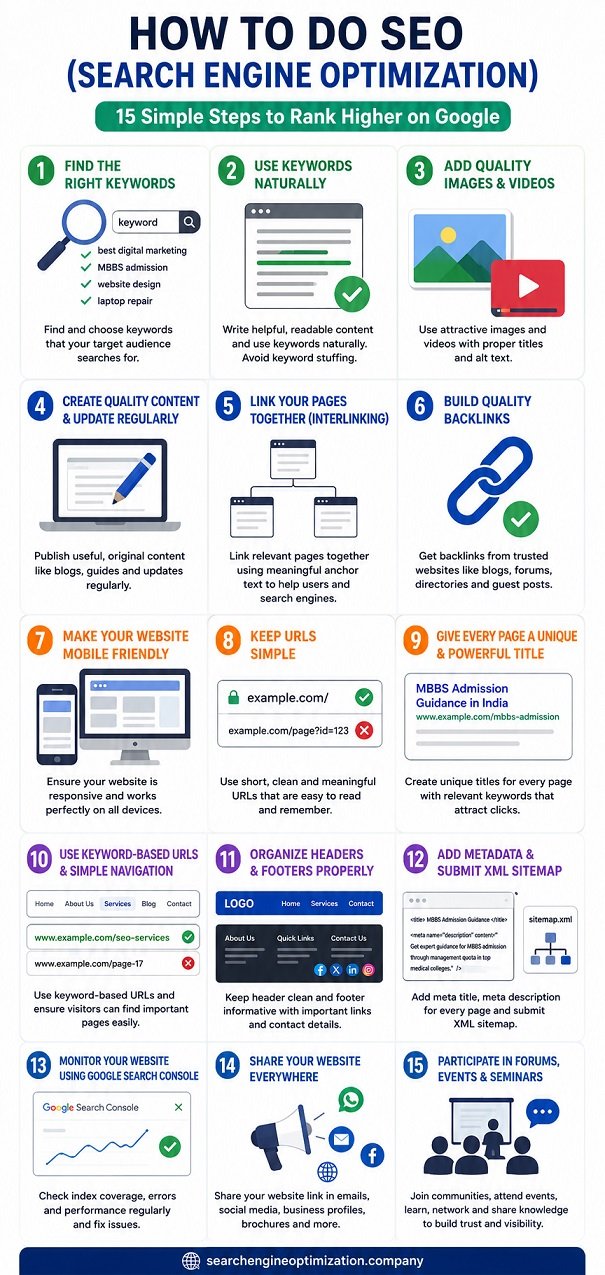
In this section, we will learn How to Do SEO (Search Engine Optimization) in a very simple way.
Think of your website as a shop in a huge city. If people cannot find your shop, they cannot buy your products or services. SEO helps search engines like Google find your website and show it to the right people.
What is Search Engine Optimization?
SEO (Search Engine Optimization) is the process of improving your website so that it appears higher in search engine results when people search for products, services, or information related to your business.
By doing SEO properly, you can:
- Get more visitors to your website.
- Reach the right audience.
- Increase inquiries, leads, and sales.
- Build trust and online visibility.
Now let’s learn SEO step by step.
Step 1: Find the Right Keywords
What are Keywords?
Keywords are the words or phrases that people type into search engines when looking for something.
Examples:
- Best digital marketing company
- MBBS admission consultant
- Website design services
- Laptop repair near me
Why are Keywords Important?
Imagine a student searches on Google for “MBBS admission through management quota”. If your website contains this keyword naturally, Google can understand that your website is related to this topic and may show your page in search results.
How to Find Keywords?
You can find keywords by:
- Using Google Keyword Planner.
- Typing your product or service name in Google and checking search suggestions.
- Looking at competitor websites.
- Thinking like your customer and asking what they would search for.
Teacher’s Tip
Do not choose random keywords. Select keywords related to your business, services, location, and target audience. Once you find the right keywords, use them on your homepage and important pages.
Step 2: Use Keywords Naturally
Many beginners think SEO means repeating the same keyword again and again. This is called keyword stuffing and should be avoided.
Bad Example
MBBS admission consultant, best MBBS admission consultant, MBBS admission consultant in India, top MBBS admission consultant.
Good Example
We help students secure MBBS admissions in top medical colleges through proper counseling and admission guidance.
Why Natural Writing Matters
Search engines want to show useful and readable content to users. Always write for people first and search engines second.
Teacher’s Tip
Ask yourself: “Would I enjoy reading this paragraph?” If the answer is no, rewrite it. You can also create separate landing pages for different services and keywords instead of putting everything on one page.
Step 3: Add High-Quality Images and Videos
People do not like reading only text. Images and videos make content more attractive and easier to understand.
Why Images Help
- Make pages attractive.
- Keep visitors engaged.
- Explain concepts quickly.
- Improve user experience.
Why Videos Help
- Explain products and services.
- Build trust.
- Increase engagement.
- Increase time spent on the website.
Important SEO Practice
Every image should have:
Image Title
A short name describing the image.
Example: MBBS Admission Counseling Session
Alt Text (Alternative Text)
A description that helps search engines understand the image.
Example: Students receiving MBBS admission guidance from education consultants.
Teacher’s Tip
Never upload images with names like IMG001.jpg or DSC1234.jpg. Rename them properly before uploading.
Example: mbbs-admission-guidance.jpg
This helps search engines understand your images better.
Step 4: Create Quality Content and Update It Regularly
Content is one of the most important parts of SEO.
What is Quality Content?
Quality content should be:
- Useful
- Original
- Easy to understand
- Relevant to users
Why Fresh Content Matters
Search engines like updated information. When you regularly publish new content, search engines visit your website more often.
You can publish:
- Blog posts
- Industry news
- Service updates
- Educational articles
Example
If you run an MBBS admission website, you can publish:
- NEET updates
- College cutoff information
- Counseling guides
- Admission deadlines
Teacher’s Tip
Try to update your website every week. Even one helpful article per week can improve your SEO over time.
Good content attracts visitors. Great content attracts visitors repeatedly.
Step 5: Link Your Website Pages Together (Interlinking)
Think of your website as a city connected by roads. If the roads are connected properly, people can travel easily from one place to another.
What is Interlinking?
Interlinking means connecting one page of your website to another page using links.
Example
On your homepage, you can link to:
- About Us Page
- Services Page
- Contact Page
- Blog Page
A blog post about MBBS admission can also link to:
- MBBS Counseling Services
- Medical College List
- Contact Page
Why Interlinking is Important?
- Helps users find more information.
- Helps search engines discover pages faster.
- Improves website structure.
- Increases time spent on the website.
Teacher’s Tip
Use meaningful link text.
Bad Example: Click Here
Good Example: Learn More About MBBS Admission Counseling
The second example clearly tells users and search engines what the linked page is about.
Final Summary
To do SEO successfully:
- Find the right keywords that people search for.
- Use keywords naturally in your content.
- Add quality images and videos with proper titles and alt tags.
- Create useful content and update it regularly.
- Interlink your website pages for better navigation.
Remember, SEO is not magic and it does not provide instant results.
Think of SEO like planting a tree. If you regularly add quality content, optimize your website, and keep it updated, your website will gradually grow and attract more visitors from search engines.
Step 6: Build Quality Backlinks from Different Platforms
What is a Backlink?
A backlink is simply a link from another website pointing to your website.
Think of backlinks as recommendations.
For example, if ten people recommend a good teacher, more students will trust that teacher. Similarly, when many good websites link to your website, search engines understand that your website may be useful and trustworthy.
Where Can You Create Backlinks?
You can build backlinks through:
- Blogs and Blogger websites
- Web 2.0 websites
- Social media profiles
- Business directories
- Forum discussions
- Infographics
- PDF sharing websites
- Question and Answer websites
- Guest posting websites
How to Do It?
First, find websites related to your business.
For example, if you provide MBBS admission guidance, look for:
- Education blogs
- Student forums
- Career guidance websites
- Educational communities
Create useful content and naturally place your website link where relevant.
Teacher’s Tip
Do not create hundreds of spam links.
One quality backlink from a trusted website is often better than 100 low-quality backlinks.
Always focus on helping users rather than just dropping links everywhere.
Step 7: Make Your Website Attractive and Mobile Friendly
Imagine entering a shop that is dirty, confusing, and poorly organized.
Would you stay there?
Probably not.
The same happens with websites.
Why Design Matters?
A good website should:
- Look professional
- Load quickly
- Be easy to read
- Be easy to navigate
What is a Responsive Website?
A responsive website automatically adjusts to different screen sizes.
Your website should work properly on:
- Mobile phones
- Tablets
- Laptops
- Desktop computers
Why is Mobile Optimization Important?
Today, most users browse websites using mobile devices.
If your website does not work properly on mobile phones, visitors may leave immediately.
Teacher’s Tip
Always test your website on different devices before publishing changes.
Ask yourself:
“Can a visitor easily use my website on a mobile phone?”
Step 8: Keep Your Website URL Structure Simple
What is a URL?
A URL is the address of a webpage.
Example:
Good URL:
www.example.com/mbbs-admission
Bad URL:
www.example.com/page?id=12345&cat=567
Why Simple URLs Matter?
Simple URLs:
- Are easier to remember
- Help search engines understand the page topic
- Improve user experience
Teacher’s Tip
Keep URLs short, meaningful, and readable.
A person should understand the page topic simply by looking at the URL.
Step 9: Give Every Page a Unique and Powerful Title
What is a Page Title?
A page title is the name that appears in search engine results and browser tabs.
Example:
MBBS Admission Guidance in India
Why Are Titles Important?
The title tells both users and search engines:
- What the page is about
- Why they should visit the page
Good Title Example
Direct MBBS Admission Through Management Quota
Poor Title Example
Home Page
The second title gives no information.
Teacher’s Tip
Every page should have:
- A unique title
- Clear meaning
- Relevant keywords
- User-friendly language
Think of the title as the headline of a newspaper article.
If the headline is attractive, more people will read it.
Step 10: Use Keyword-Based URLs and Simple Navigation
What is Navigation?
Navigation means the menu and links that help users move around your website.
Example
A visitor should be able to find:
- Home
- About Us
- Services
- Blog
- Contact Us
without confusion.
Keyword-Based URL Example
Good:
www.example.com/seo-services
Bad:
www.example.com/page-17
Why Does This Help?
- Search engines can easily understand the page topic.
- Users also know what they will find before opening the page.
Teacher’s Tip
Never make users click many times to reach important information.
Important pages should be accessible within a few clicks.
Step 11: Organize Headers and Footers Properly
What is a Header?
The header is the top section of a website.
Usually it contains:
- Logo
- Navigation menu
- Contact information
What is a Footer?
The footer is the bottom section of a website.
Usually it contains:
- Contact details
- Important links
- Privacy Policy
- Terms and Conditions
- Social media links
Why Are They Important?
A well-organized header and footer help visitors quickly find information.
Teacher’s Tip
Do not overload your header with too many menu options.
Keep it clean and easy to understand.
Step 12: Add Proper Metadata and Submit an XML Sitemap
What is Metadata?
Metadata is information that helps search engines understand your page.
Important metadata includes:
Meta Title
The title shown in search results.
Meta Description
A short summary of the page.
Example:
“Get expert guidance for MBBS admission through management quota in top medical colleges.”
What is an XML Sitemap?
A sitemap is like a roadmap of your website.
It tells search engines:
- Which pages exist
- Which pages should be crawled
Why Submit a Sitemap?
It helps search engines discover your pages faster.
Teacher’s Tip
Whenever you add new pages, ensure your sitemap is updated.
Step 13: Monitor Your Website Using Google Search Console
What is Google Search Console?
Google Search Console is a free tool provided by Google.
It helps website owners understand:
- How Google sees their website
- Which pages are indexed
- Which pages have errors
What is the Index Coverage Report?
This report shows:
- Indexed pages
- Pages with errors
- Pages that need attention
Why Is It Useful?
Sometimes Google cannot access certain pages.
The report helps you identify and fix those problems.
Teacher’s Tip
Check Search Console regularly.
Think of it as your website’s health report.
Step 14: Share Your Website Everywhere You Communicate
Many business owners build a website but never share it.
This is a mistake.
Where Can You Share Your Website?
You can add your website URL in:
- WhatsApp messages
- Email signatures
- Business profiles
- Social media accounts
- Brochures
- Visiting cards
- Online directories
Why Does This Help?
More people become aware of your website.
This can bring:
- More visitors
- More inquiries
- More business opportunities
Teacher’s Tip
Whenever someone asks about your services, provide your website link along with your response.
Step 15: Participate in Forums, Events, and Seminars
Why Should You Participate?
SEO is constantly changing.
By joining communities and events, you can:
- Learn new techniques
- Meet industry experts
- Understand market trends
- Get practical advice
Where Can You Participate?
- SEO forums
- Digital marketing communities
- Business networking groups
- Webinars
- Workshops
- Conferences
- Educational seminars
Additional Benefit
While helping others and sharing your knowledge, people may naturally visit your website and recommend it to others.
Teacher’s Tip
Do not attend events only to promote yourself.
Focus on learning, networking, and helping others.
When people trust your knowledge, they will naturally become interested in your website and services.
Local SEO Services in India
Final Summary of Steps 6 to 15
To improve your SEO further:
- Build quality backlinks from trusted websites.
- Make your website attractive and mobile-friendly.
- Keep URLs simple and easy to understand.
- Create unique titles for every page.
- Use keyword-based URLs and clear navigation.
- Organize headers and footers properly.
- Add metadata and submit an XML sitemap.
- Monitor website health using Google Search Console.
- Share your website link wherever possible.
- Participate in SEO communities, forums, events, and seminars.
Remember: SEO is not a one-day task. It is a continuous process of improving your website, helping users, and building trust with search engines. The more value you provide, the better your website can perform in search results.